Package Page
Business Object Package Files can be created and managed on the Package page.
|
Business Object Builder - Package Page |
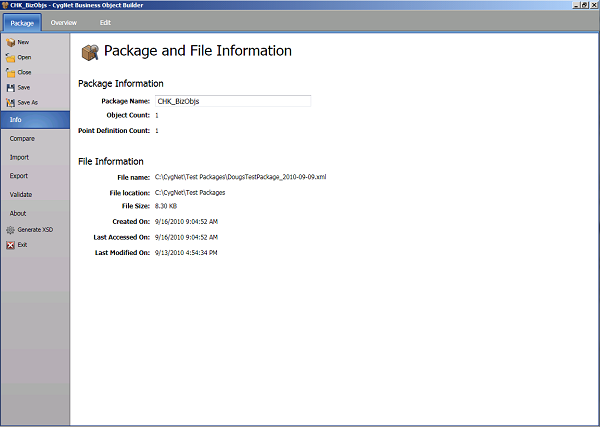
Options available on the Package page include the following.
General
| Option | Description |
|---|---|
|
New |
Creates a new Business Object Package file and name it. |
|
Open |
Opens an existing Business Object Package. |
|
Close |
Closes the current Business Object Package. |
|
Save |
Saves the current Business Object Package. |
|
Save As |
Saves the current Business Object Package to a new specified file location. |
Options
| Option | Description |
|---|---|
|
Info |
Displays Package Information and File Information for the currently selected Package. This is the default screen for the Package page. |
|
Compare |
Compares the current Package to another selected Package and display the results. Hover over the connecting line to display the differences. See File Comparison for more information. |
|
Import |
Imports package items into the current Business Object Package from another Package File. See File Import and Export Options for more information. |
|
Export |
Exports package items from the current Business Object Package to another Package File. See File Import and Export Options for more information. |
|
Validate |
Validates the current Business Object Package and manage the results. See Validation for more information. |
|
About |
Displays information about the CygNet Business Object Builder including the version and file location. |
|
Generate XSD |
Generates the XSD schema file for the current Business Object Package and accesses selection of the directory location for the file. See Schema and Schema Files for more information. |
|
Exit |
Exits CygNet Business Object Builder. |


